Use your Android as a wireless PC racing wheel
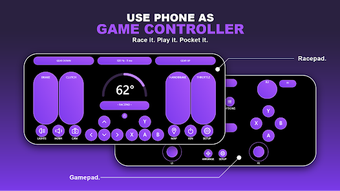
Turns an Android phone into a motion-based steering wheel for Windows PCs, using the device gyroscope to steer and touch pedals to control throttle and braking. Gyropad, from Sharper Studio, pairs with a companion Windows server over a shared Wi-Fi network to transmit inputs. The app provides two operation modes, an automatic pairing system, and customizable on-screen controls. It targets PC racing players who want a portable alternative to a physical wheel for simulation titles.
What the app does and how it connects
The app captures phone sensor data and sends it to a PC server, turning gyroscope and accelerometer readings into steering input while on-screen elements report button and pedal presses. The mobile client requires a companion server running on a Windows desktop to receive input packets. Both devices must share the same Wi-Fi network, and the app pairs automatically so you do not need to type manual codes to link phone and PC.
How responsive the input is for racing
Low-latency transmission is designed for fast-paced gameplay, so tilt steering and pedal touches aim to update in near real time. The app’s design maps continuous motion sensor streams to steering axes and sends discrete touch events for gas, brake, and gears. That mapping reduces the need for third-party mapping tools by offering native steering and controller modes tuned for simulation titles.
Safety and system interaction
The tool operates as an input client and does not modify system files; it requires only the server to accept controller input on the desktop. Because it sends input over the local network, you should use a trusted Wi-Fi environment when pairing. The app’s workflow avoids writing to the registry or installing kernel drivers on the PC side, limiting its system footprint to the running server process.
Who can use it and the learning curve
Casual racers can get started quickly while sim enthusiasts can fine-tune control mapping. The automatic pairing and default control layout let less technical users begin testing in minutes. More advanced players can adjust sensitivity and button layout on the phone to better match steering feel for specific simulators. Expect a short calibration step before race sessions to align phone orientation with in-game steering axes.
Reasonable choice for gamers needing an accessible motion controller
Gyropad suits PC racing players who want a portable motion-based input without a hardware wheel. It relies on a local Wi-Fi link and a companion server, so network quality affects responsiveness; test pairing and calibration before competitive sessions. Recommended.